- Jul 5, 2016
Adapter Startech.com : ICUSBS232D on Linux
How to Install your adapter ICUSBS232D on Linux?
Startech did not explained how to use the ICUSB232D adapter on Linux in the notice.
You will find bellow my procedure that i have used to set it up, you can use and share it.
Connect the provided USB 2.0 Cable to the USB Serial Adapter, and then to an available USB port on the computer.
Linux should recognize automatically the adapter, now you can use your terminal and write this command:
Check result « pl2303 ». Exemple:
[ 3.785197] usb 1-3.4: pl2303 converter now attached to ttyUSB0Keep your tty, in this exemple it’s « ttyUSB0 ».
Now, you can install minicom on Linux (exemple on Debian):
apt-get install minicomAfter installing, please open up minicom by running this command:
minicom -sTo set up: enter in the « serial port setup » and set the serial device by «/dev/ttyUSB0».
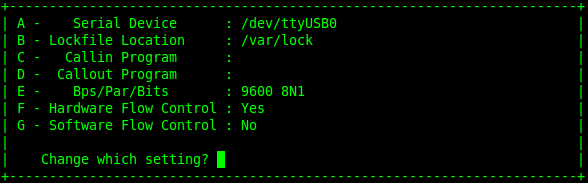
You are done, you can Press « Enter » command and save the configuration
Then you will start:
minicomI submitted this procedure to assistance@startech.com and i hope he will update their document.